

































































































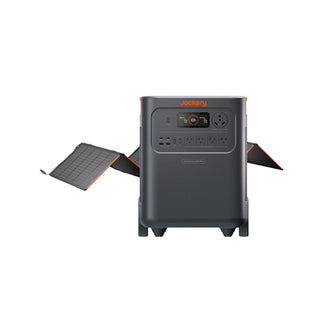



























![[Add-on] Jackery SolarSaga 500 X - Jackery](http://www.jackery.com/cdn/shop/files/add-on-jackery-solarsaga-500-x-1493607.webp?v=1786503068&width=324)





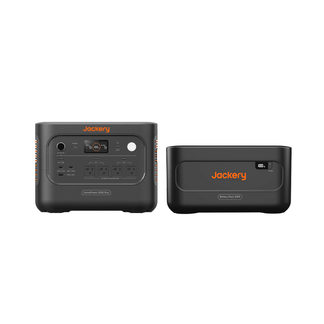
![[Add-on] Jackery Battery Pack 5000 Plus - Jackery](http://www.jackery.com/cdn/shop/files/add-on-jackery-battery-pack-5000-plus-6713401.webp?v=1786503068&width=324)


























































Product Model |
JE-1000C |
Battery Capacity |
1264Wh |
Type of Battery Used |
LiFePO₄ |
Battery Cycle Life (Durability) |
4000 cycles≥70% |
Type of Product Output Current |
Pure Sine Wave |
Product Dimensions (cm) (W)Length × (D)Width × (H)Height |
35.6 × 26.0 × 28.3 |
Product Weight |
Around 14.5Kg |
Product Color |
Black |
Product AC Input Specification |
120V, 60Hz, Max. 15A (Max. Input Power: 1200W ± 50W) |
Minimum Power Required for Product AC Input |
Over 1400W |
DC Input Specification (Solar Power Input Specification) |
Supports 12–60V Single Port Usage: Current Limit 11A, Max. Input Power 400W Dual Port Usage: Current Limit 22A, Max. Input Power 800W |
DC Input Specification (Car Charger Input Specification) |
12V, Current Limit 11A |
Number of Input Ports When Charging Product with DC (Panel Charger/Car Charger) |
2 |
Input Port for Charging Product with Solar Panel |
DC8020 |
Input Port for Charging Product with Car Charger Port |
DC8020 |
Product AC Charging Time |
Around 1.7H |
Product Charging Time with Car Charger Port |
Around 14.5H |
Product Charging Time with Solar Panel Solarsaga40 |
No Verified Data |
Product Charging Time with Solar Panel Solarsaga80 |
No Verified Data |
Product Charging Time with Solar Panel Solarsaga100 |
1 Panel: Around 18H 2 Panels: Around 9H 4 Panels: Around 4.5H |
Product Charging Time with Solar Panel Solarsaga200 |
1 Panel: Around 9H 2 Panels: Around 4.5H 4 Panels: Around 2H |
Product Charging Time with Solar Panel Solarsaga 500 X |
/ |
Product Charging Time with Roof High Voltage Solar System |
/ |
Product AC Output Specification |
120V/20A, Max. 2000W Per Port; Max. 2000W Total For 3 Ports. |
Maximum Instantaneous Output Power |
4000w |
Number of Product AC Output Ports |
3 |
AC Output Frequency |
60HZ |
Product Car Charger Port Specification |
12V/10A |
Number of Product Car Charger Ports |
1 |
Number of Product USB Ports |
4 |
Product USB-A Port Output Specification |
Max. 18W |
Product Specification for Input via USB-C Port |
No USB-C Input Port |
Product USB-C Port Output Specification |
2*USB-C: Max. 100W |
Temperature Range for Product Charging |
0 ℃ ~ 45 ℃ |
Discharge Temperature Range |
-10 ℃ ~ 45 ℃ |
Storage Temperature Range |
1 Month: -20 ℃ ~ 45 ℃; 3 Months: 0 ℃ ~ 45 ℃; 1 Year: 0 ℃ ~ 25 ℃ |
Material of Product Housing |
PC + ABS High-Strength Plastic |
Product Warranty Period |
Standard Warranty: 3 Years. Extendable by 2 Years for a Max Total of 5 Years. |
Accessories |
1 * Portable Power Station 1 * AC Charging Cable 1 * Car Charging Cable (8020) 1 * User Manual |
Noise Level of Product Cooling Fan |
≤ 45dB |
Standby Power Consumption |
22W |
Does it Have EPS Function |
Connect the electrical appliance plug to the AC output port of the portable power station, and connect the portable power station to a household wall outlet using the AC charging cable. Even in the event of a power outage, the unit is equipped with an EPS function that automatically switches to battery power within 20 ms (0.020 seconds). In the case of a sudden power failure, power supply can continue within the remaining battery capacity of the portable power station. However, the EPS function does not support 0 ms (instantaneous) switching. Therefore, devices such as data servers and workstations that require full UPS functionality (no momentary power interruption) are not supported. Thank you for your understanding in advance. |
Are additional accessories required to connect the solar panel? |
■ Regarding the necessity of purchasing additional series boxes: Connecting 1 or 2 Panels: Can be connected using the included cable. No additional purchase required. Connecting 3 Panels: Requires 1 × SolarSaga Adapter (for Pro/Plus/V Series). Connecting 4 Panels: Requires 2 × SolarSaga Adapters (for Pro/Plus/V Series). |
Does the AC charging cable include a grounding wire, and how should it be used? |
Grounding wire included. |
Maximum Number of Solar Panels That Can Be Connected |
Supports connection for 1 panel / 2 panels / 3 panels / 4 panels. |
Supports Charging with Jackery Products? |
When charging this unit from the AC output of portable power station A, it is supported if A's “AC output” is 1400W or higher. |
Maximum AC output power during simultaneous charging and discharging |
12A Max in Simultaneous Charging and Discharging Mode |
Maximum DC output (car charging port output) power during simultaneous charging and discharging |
12V, 10A, Max. 120W |
Can the product connect to 2 solar panels |
Supported. The two DC input ports are independent, so they support connecting panels even with different wattages. |
Can the product connect to 3 or more solar panels |
Supports connection of 3 panels: Use a Solar panel connector to combine 2 panels and connect them to DC Input 1. Connect the remaining panel directly to DC Input 2. ※ All panels connected to the Solar panel connector must have the same output and model. (e.g., all 100W (JS-100F) or all 200W (JS-200D)) ※ Do not connect all three panels together using a single adapter (risk of overvoltage). Connecting 4 panels: Use adapters to combine 2 panels each, and connect them separately to DC Input 1 and DC Input 2. ※ All panels connected to the Solar panel connector must have the same output and model. (e.g., all 100W (JS-100F) or all 200W (JS-200D)) |
Are the two DC input ports parallel or independent |
Independent |
Connection rules when both DC ports are used simultaneously |
The unit has two DC input ports, each supporting a maximum of two solar panels. Neither the quantity nor the model of solar panels connected to each port needs to be consistent. |
Can the product be charged by a solar panel and a car charger at the same time? |
Supported. |
Can the product be charged using two car charging cables at the same time? |
Supported. |
Does the product support battery packs? |
The product supports battery packs (compatible with the E1000 Plus), with up to 3 packs usable simultaneously. |
Does the product support app control? |
Supported. |
Does it have waterproof and dustproof? |
Not supported. |
Can the AC output frequency be switched |
Not supported. |
Does the product support parallel operation |
Not supported. |
Is the AC charging cable UL certified? |
Yes, the AC charging cable included with the portable power supply bears the UL certification mark, ensuring safe use. |
Does it have LED lighting |
Supported. |
Can it be charged using a car fast charger? |
Supported. |
Charging time with car fast charger |
No Verified Data |
Can wall charging and Solar charging be performed simultaneously |
Supported. |
Can the Energy Saving Mode be turned off |
Supported. |
Can the device status be monitored via the app |
Supported. |
Can the AC/DC output be turned on/off via the app |
Supported. |
Can the LED display be turned on or off and scheduled via the app |
Supported. |
Can the LED light be turned on or off via the app? |
Supported. |
Does the app allow setting auto-shutdown? |
Supported. |
Is it possible to set Battery Saving Mode in the app |
Supported. |
Is it possible to set Quiet Charging Mode in the app |
Supported, but not supported when connected to the back of the battery. |
Can product specifications be viewed in the app |
Supported. |
Can the user manual be accessed through the app |
Supported. |
Can the device be shared using a QR code |
Supported. |
Can the temperature display be set in the app |
Supported. |
Is it possible to configure the system language through the app |
Supported. |
Is it possible to set the Battery saving mode (15% to 85%) in the app |
Supported, but not supported when connected to the back of the battery. |
Can the charging range for Battery saving mode be adjusted via the app |
Not supported. |
Is it possible to set the emergency charging mode in the app |
Not supported. |
Does it have solar power generation analytics? |
Not supported. |
Does it have a timed charging (charging plan) function |
Not supported. |
Does this system have a Self-powered Mode |
Not supported. |
Can the Wi-Fi MAC address be viewed in the app |
Not supported. |
Is it possible to set AC charging speed in the app |
Not supported. |
Can the AC/DC output time be set through the APP? |
Not supported. |
Plug type and usage scenario for the 30A output port on Power Station |
/ |
Plug type and usage scenario for the 50A output port on Power Station |
/ |
Does it support pass-through charging? |
Yes, supported. Additionally, the pass-through mode allows simultaneous charging and discharging, so using the portable power supply while charging does not affect its lifespan. |
Location of the SN |
The SN is located on the back of the device. |
How to reset the device |
Press and hold both the Power and USB buttons simultaneously for five seconds. The screen will briefly turn off and then relight, displaying the remaining battery percentage — this confirms the reset was successful. |
Can Wi-Fi/Bluetooth be reset separately |
Yes |
How to reset Wi-Fi/Bluetooth |
Press and hold both the Power and USB buttons simultaneously for five seconds. The screen will briefly turn off and then relight, displaying the remaining battery percentage — this confirms the reset was successful. |
How to activate the Bluetooth/Wi-Fi module after it has been turned off. |
Press and hold the USB and AC buttons simultaneously for 3 seconds. |
How much battery capacity is typically lost due to self-discharge when the power station is not in use? |
Around 1%-3% per month |
About app settings when the battery is fully depleted For example, if the current app settings are “Battery Saving Mode |
Disabled” and “Auto Power-Off: Never,” will these settings remain the same after the battery is drained and then recharged? Or will they be reset to default?: These settings will remain unchanged once the battery is restored, provided no reset is performed. |
Is the neutral wire floating or Bonded? |
floating |
