

































































































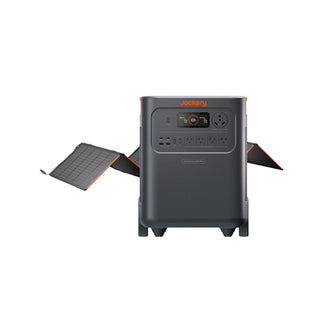



























![[Add-on] Jackery SolarSaga 500 X - Jackery](http://www.jackery.com/cdn/shop/files/add-on-jackery-solarsaga-500-x-1493607.webp?v=1786503068&width=324)





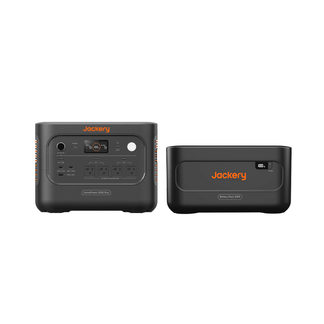
![[Add-on] Jackery Battery Pack 5000 Plus - Jackery](http://www.jackery.com/cdn/shop/files/add-on-jackery-battery-pack-5000-plus-6713401.webp?v=1786503068&width=324)


























































Product Model |
JE-5000A |
Battery Capacity |
5040Wh |
Type of Battery Used |
LiFePO₄ |
Battery Cycle Life (Durability) |
4000 cycles≥70% |
Type of Product Output Current |
Pure Sine Wave |
Product Dimensions (cm) (W)Length × (D)Width × (H)Height |
42.0 × 39.0 × 63.5 |
Product Weight |
Around 61 kg |
Product Color |
Black |
Product AC Input Specification |
120V, 60Hz, Max. 15A (Max. Input Power: 1750W ± 50W) |
Minimum Power Required for Product AC Input |
1800W |
DC Input Specification (Solar Power Input Specification) |
High-Voltage PV Input: 135–450V ⎓ Max. 15A, Max. Input Power 4000W Low-Voltage PV Input: Supports 16–60V ·Single Port Usage: Current Limit 10.5A, Max. Input Power 600W ·Dual Port Usage: Current Limit 21A, Max. Input Power 1200W |
DC Input Specification (Car Charger Input Specification) |
11–16V (Operating Voltage) ⎓ Max. 8A |
Number of Input Ports When Charging Product with DC (Panel Charger/Car Charger) |
2 |
Input Port for Charging Product with Solar Panel |
DC8020 |
Input Port for Charging Product with Car Charger Port |
DC8020 |
Product AC Charging Time |
Around 3.5H |
Product Charging Time with Car Charger Port |
50.5H |
Product Charging Time with Solar Panel Solarsaga40 |
No Verified Data |
Product Charging Time with Solar Panel Solarsaga80 |
No Verified Data |
Product Charging Time with Solar Panel Solarsaga100 |
1 Panel: Around 70H 2 Panels: Around 35H 3 Panels: Around 26H 4 Panels: Around 17.5H |
Product Charging Time with Solar Panel Solarsaga200 |
1 Panel: Around 34H 2 Panels: Around 17.5H 3 Panels: Around 11.5H 4 Panels: Around 9H |
Product Charging Time with Solar Panel Solarsaga 500 X |
1 Panel:Around 17H 2 Panes:Around 8.5H |
Product Charging Time with Roof High Voltage Solar System |
135–450V ⎓ 15A Max, 4000W Max, 1.7H |
Product AC Output Specification |
AC Output (NEMAL14-30R): 240V ~ 60Hz, Max. 7200W AC Output (NEMAL14-50R): 240V ~ 60Hz, Max. 7200W 4AC (5-20): Single Port Output: 120V / 20A, 2400W; AC1 + AC2 or AC3 + AC4: 120V / 30A, 3600W Max. During Simultaneous Charge & Discharge (Split Outlet Mode): 240V Ports: No Output 120V Ports: *Backup UPS Mode: 120V, 12A Max. (Peak 13.2A); *Online UPS Mode: 120V, 30A Max. |
Maximum Instantaneous Output Power |
7200W |
Number of Product AC Output Ports |
6 |
AC Output Frequency |
60HZ |
Product Car Charger Port Specification |
12V,10A |
Number of Product Car Charger Ports |
1 |
Number of Product USB Ports |
4 |
Product USB-A Port Output Specification |
5-6V⎓3A, 6-9V⎓2A, 9-12V⎓1.5A, Max. 18W |
Product Specification for Input via USB-C Port |
No USB-C Input Port |
Product USB-C Port Output Specification |
2*USB-C: Max. 100W |
Temperature Range for Product Charging |
0 ℃ ~ 45 ℃ |
Discharge Temperature Range |
-15 ℃ ~ 45 ℃ |
Storage Temperature Range |
1 Month: -20 ℃ ~ 45 ℃; 3 Months: 0 ℃ ~ 45 ℃; 1 Year: 0 ℃ ~ 25 ℃ |
Material of Product Housing |
PC + ABS High-Strength Plastic |
Product Warranty Period |
Warranty Period: 5 Years. Extended Warranty: Not Supported. |
Accessories |
1 * Main Unit 1 * AC Charging Cable 1 * MC4 Wrench 1 * User Manual |
Noise Level of Product Cooling Fan |
≤ 30dB |
Standby Power Consumption |
50W |
Does it Have UPS Function |
Through the application, you can select and configure either “Online UPS” or “Backup UPS Function.” In Online UPS mode, the system automatically switches to power supplied by the portable power station within 0 ms in the event of a power outage. In Backup UPS mode, the system automatically switches within less than 20 ms (0.02 seconds) when a power failure occurs. In addition, this product supports a pass-through function, allowing household appliances such as desktop computers and refrigerators to be used while the unit is charging. By keeping devices that you want to protect from power interruptions connected at all times, you can continue to use them with confidence even in the event of a power outage. Note: The Backup UPS Function is designed as a general-purpose UPS function for household use. For servers, business workstations, or other equipment that requires uninterrupted power with no downtime during outages, it is recommended to use Online UPS mode. |
Are additional accessories required to connect the solar panel? |
■ Regarding the necessity of purchasing additional series boxes: 1 or 2 Panels: Can be connected using the included cable. No purchase required. 4 Panels: Requires 2 × SolarSaga Adapters (for Pro/Plus/V Series). |
Does the AC charging cable include a grounding wire, and how should it be used? |
Grounding wire included. |
Maximum Number of Solar Panels That Can Be Connected |
Supports connection for 1 panel / 2 panels / 3 panels / 4 panels / 6 panels. |
Supports Charging with Jackery Products? |
When charging this unit from the AC output of portable power station A, it is supported if A's “AC output” is 1900W or higher. |
Maximum AC output power during simultaneous charging and discharging |
Backup UPS Mode: 120V, 12A Max (13.2A Peak); Online UPS Mode: 120V, 30A Max |
Maximum DC output (car charging port output) power during simultaneous charging and discharging |
12V, 10A, Max. 120W |
Can the product connect to 2 solar panels |
Supported. However, because the two DC input ports are connected in parallel, connecting solar panels with different wattages simultaneously is not supported. That is, a configuration with 100W on one port and 200W on the other port is not supported. |
Can the product connect to 3 or more solar panels |
Direct Connection of 3 Panels: Utilize an adapter to combine three panels and connect them to DC Input 1. ※ Regarding the conversion adapter located at the front of the panel, please either remove it or connect it directly to the SolarSaga adapter, depending on the specific panel model. ※ All panels connected to the SolarSaga adapter must have identical output and model specifications (e.g., all 100W (JS-100F) or all 200W (JS-200D)). Connecting 4 Panels: Use adapters to combine two panels each, then connect them separately to DC Input 1 and DC Input 2. Connecting 6 Panels: Use adapters to combine three panels each, then connect them separately to DC Input 1 and DC Input 2. Notes When Connecting 4 or 6 Panels: Precautions When Using Both DC Ports Simultaneously (Connection Rules):
※ In cases where different models are mixed, all of the following conditions must be satisfied:
Note:The E5000plus does not support connecting more than two 500X units. 200D (Max output: 200W / Operating voltage: 20V / Open-circuit voltage: 24.8V) 200C (Max output: 200W / Operating voltage: 20V / Open-circuit voltage: 24.8V) → As described above, if the maximum output, operating voltage, and open-circuit voltage are all the same, mixed use is supported even if the models are different. |
Are the two DC input ports parallel or independent |
Parallel |
Connection rules when both DC ports are used simultaneously |
The unit has two DC input ports, each supporting a maximum of 2 panels. The quantity and model of panels connected to each port must be consistent. |
Can the product be charged by a solar panel and a car charger at the same time? |
Not supported. |
Can the product be charged using two car charging cables at the same time? |
Not supported. |
Does the product support battery packs? |
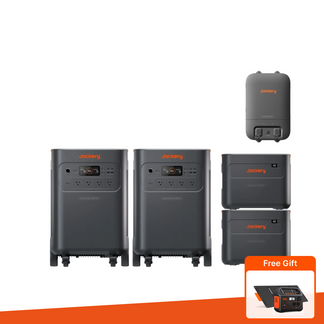
The product supports battery packs (compatible with the E5000 Plus), with up to 5 packs usable simultaneously. |
Does the product support app control? |
Supported. |
Does it have waterproof and dustproof? |
Not supported. |
Can the AC output frequency be switched |
Not supported. |
Does the product support parallel operation |
Supported. |
Is the AC charging cable UL certified? |
Yes, the AC charging cable included with the portable power supply bears the UL certification mark, ensuring safe use. |
Does it have LED lighting |
Not supported. |
Can it be charged using a car fast charger? |
Supported. |
Charging time with car fast charger |
No Verified Data |
Can wall charging and Solar charging be performed simultaneously |
Supported. |
Can the Energy Saving Mode be turned off |
Supported. |
Can the device status be monitored via the app |
Supported. |
Can the AC/DC output be turned on/off via the app |
Supported. |
Can the LED display be turned on or off and scheduled via the app |
Supported. |
Can the LED light be turned on or off via the app? |
/ |
Does the app allow setting auto-shutdown? |
Supported. |
Is it possible to set Battery Saving Mode in the app |
Supported. |
Is it possible to set Quiet Charging Mode in the app |
Supported. |
Can product specifications be viewed in the app |
Supported. |
Can the user manual be accessed through the app |
Supported. |
Can the device be shared using a QR code |
Supported. |
Can the temperature display be set in the app |
Supported. |
Is it possible to configure the system language through the app |
Supported. |
Is it possible to set the Battery saving mode (15% to 85%) in the app |
Supported, but not supported when connected to the back of the battery. |
Can the charging range for Battery saving mode be adjusted via the app |
Supported. |
Is it possible to set the emergency charging mode in the app |
Not supported. |
Does it have solar power generation analytics? |
Supported. |
Does it have a timed charging (charging plan) function |
Supported. |
Does this system have a Self-powered Mode |
Supported. |
Can the Wi-Fi MAC address be viewed in the app |
Supported. |
Is it possible to set AC charging speed in the app |
Not supported. |
Can the AC/DC output time be set through the APP? |
Not supported. |
Plug type and usage scenario for the 30A output port on Power Station |
Plug/Socket Type: NEMA L14-30R (Locking Type) The NEMA L14-30R is a locking socket designed to prevent accidental disconnection. It is widely used in industrial, commercial, and outdoor applications. Suitable for connection with high-output equipment such as generators, welding machines, and air conditioning units,it is commonly employed in situations requiring stable power supply and high connection reliability. |
Plug type and usage scenario for the 50A output port on Power Station |
/ |
Does it support pass-through charging? |
Yes, supported. Additionally, the pass-through mode allows simultaneous charging and discharging, so using the portable power supply while charging does not affect its lifespan. |
Location of the SN |
The SN is located on the back of the device. |
How to reset the device |
Press and hold both the Power and USB buttons simultaneously for five seconds. The screen will briefly turn off and then relight, displaying the remaining battery percentage — this confirms the reset was successful. |
Can Wi-Fi/Bluetooth be reset separately |
Yes |
How to reset Wi-Fi/Bluetooth |
Press and hold both the Power and USB buttons simultaneously for five seconds. The screen will briefly turn off and then relight, displaying the remaining battery percentage — this confirms the reset was successful. |
How to activate the Bluetooth/Wi-Fi module after it has been turned off. |
Press and hold the USB and AC buttons simultaneously for 3 seconds. |
How much battery capacity is typically lost due to self-discharge when the power station is not in use? |
Around 1%-3% per month |
About app settings when the battery is fully depleted For example, if the current app settings are “Battery Saving Mode |
Disabled” and “Auto Power-Off: Never,” will these settings remain the same after the battery is drained and then recharged? Or will they be reset to default?: These settings will remain unchanged once the battery is restored, provided no reset is performed. |
Is the neutral wire floating or Bonded? |
floating |


