

















































![[Add - on] Jackery Manual Transfer Switch for Explorer 5000 Plus - Jackery](http://www.jackery.com/cdn/shop/files/add-on-jackery-manual-transfer-switch-for-explorer-5000-plus-9017324.png?v=1754016782&width=350)









![[Add - on] Jackery Battery Pack 5000 Plus - Jackery](http://www.jackery.com/cdn/shop/files/add-on-jackery-battery-pack-5000-plus-6078351.png?v=1754016791&width=324)



![[Add - on] Jackery Car Charging Cable - Jackery](http://www.jackery.com/cdn/shop/files/add-on-jackery-car-charging-cable-3882421.png?v=1754016863&width=324)



















![[Add - on] Jackery Smart Transfer Switch - Jackery](http://www.jackery.com/cdn/shop/files/add-on-jackery-smart-transfer-switch-5842915.png?v=1754016784&width=324)
![[Add - on]Jackery 102W GaN 3 - Port Fast Charger - Jackery](http://www.jackery.com/cdn/shop/files/add-onjackery-102w-gan-3-port-fast-charger-6377742.png?v=1754016790&width=324)















![[Add - on] SolarSaga 200W - Jackery](http://www.jackery.com/cdn/shop/files/add-on-solarsaga-200w-4834329.png?v=1754016915&width=324)

![[Add - on] Jackery Manual Transfer Switch for Explorer 5000 Plus - Jackery](http://www.jackery.com/cdn/shop/files/add-on-jackery-manual-transfer-switch-for-explorer-5000-plus-9017324.png?v=1754016782&width=324)


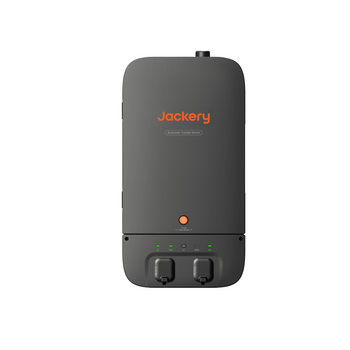
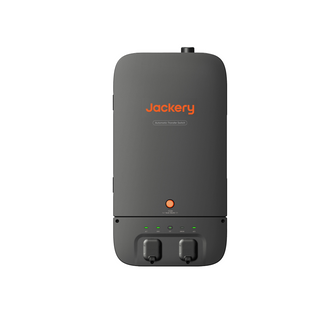
Jackery Automatic Transfer Switch
- Seamless Power Switch: Provides UPS backup within ≤20ms during power outages, ensuring uninterrupted operation.
- Eco-Friendly & Silent: Designed to integrate with solar panels and rooftop PV systems via Jackery Explorer 5000 Plus for sustainable energy use.
- Energy Savings: Charging-discharging mode helps reduce electricity costs.
- Compact & Maintenance-Free: Lightweight, easy to install.
- Smart App Control: Enables real-time monitoring and energy management.
- Note: The Automatic Transfer Switch is only compatible with the Jackery 5000 Plus Series.

Payment Methods


Jackery Automatic Transfer Switch, paired with the Jackery 5000 Plus, ensures seamless ≤20ms power switching to keep essential devices running during outages. With smart app management, you can monitor energy usage and optimize power for greater efficiency and savings.
Uninterrupted Comfort

Jackery Smart Home Kit (Explorer 5000 Plus + Automatic Transfer Switch) consists of a portable power station and an automatic transfer switch. It supports whole-home or essential home load backup, accommodating a wide range of household appliances—from refrigerators and internet equipment to sump pumps and living room lighting. Whether it's a storm or an unexpected blackout, your home is covered with a reliable, high-capacity power solution.
Uninterrupted Power Supply with 20ms Seamless Switching

Enjoy continuous power with our UPS system, designed to switch seamlessly in just 0.02 seconds to keep your refrigerator, computer, and router running without interruption. Please note: This UPS feature requires pairing with the Explorer 5000 Plus and must be activated through the app for optimal performance.
Save on Electricity Bills

Our Automatic Transfer Switch system helps reduce energy costs by optimizing power usage. It automatically switches to stored power during peak hours and uses grid power during off-peak times, ensuring efficient energy consumption and savings on your electricity bill.
Smart App Management

Manage your power system effortlessly with our intelligent app. It allows real-time monitoring, remote control of circuits, and customized power settings, helping you optimize energy use and enhance efficiency, all from the convenience of your smartphone.
ATS vs STS vs Manual Transfer Switch


In-Depth Review: See It in Action

Automatic Transfer Switch Installation Guidance
You may use your own certified electrician or handle the ATS installation yourself (if you are certified) at your own expense. The ATS User Guide and installation videos are available on our website for your reference. Jackery has partnered with third-party installation companies to provide installation services for US customers. We highly recommend contacting Jackery for installation, training, and certification before proceeding with your installation.
Once you receive your Jackery 5000 Plus and the ATS, please complete the online ATS Installation Request Form and contact Jackery to initiate the installation process. A representative from our partnered installation company will reach out to discuss logistics and service coverage in your area. An assigned electrician will collaborate with you on scheduling, on-site surveys, installation details, and costs. If you have any questions or concerns about your installation, you can always contact Jackery via email at hello@jackery.com or by phone at 888.502.2236.
Get started → ATS Installation Request Form
Installation service is limited to designated areas. See T&C for details.
SPECIFICATIONS
| SPECIFICATIONS | Jackery Smart Transfer Switch |
|
Model No. |
JA-TS05A |
|
AC Voltage (Nominal) |
120V/240V~ 60Hz |
|
Feed-In Type |
Split Phase |
|
Maximum Input Current |
100A Grid / 84A Power Station |
|
Maximum Output Current |
100A Home Load / 33.4A Power Station |
|
Maximum Input Short-Circuit Current |
10KA |
|
Overvoltage Category |
III |
|
UPS |
≤20ms |
|
Enclosure Type (Distribution Panel) |
NEMA Type 3R |
|
Main Circuit |
2 AWG (100A) |
|
Load Circuit |
2AWG-4/0AWG (100A) |
|
Communication |
Wi-Fi and Bluetooth |
|
Operating Temperature |
-4°F to 122°F / -20°C to 50°C |
|
Weight |
About 23.1 lbs/10.5 kg |
|
Dimensions |
27 x 14.4 x 5.7 in/68.5 x 36.5 x 14.4 cm |
|
Package List |
1.Jackery Automatic Transfer Switch 2. Marking-off Template 3. Power Input/Output Cable 4. Cable Gland 5. User Manual 6. Installation Manual 7. Quick Guide |
|
User Manual |
|
|
Installation Manual |
|
|
Quick Guide |
What's in The Box

- FEATURES
- TECH SPECS
- FAQ
- REVIEWS

FAQ
-
The Automatic Transfer Switch can connect to the Jackery Explorer 5000 Plus, with support for up to 2 units simultaneously.
-
It requires split-phase 120V/240V 60Hz power.
-
The Automatic Transfer Switch connects to your home’s distribution panel and can support whole-home backup or essential home load backup, depending on the installation setup, system capacity, and total load demand. It may help power selected household loads such as refrigerators, network equipment, sump pumps, lighting, and other essential devices, if they are included in the connected loads and remain within system limits. Installation must be handled by qualified electrical personnel.
-
The Automatic Transfer Switch must be installed by a professional installer. The distribution box is rated NEMA Type 3R and can be installed indoors or outdoors. The plug box is not waterproof and must be installed indoors in a dry, well-ventilated area free from water leakage risks.
-
The Automatic Transfer Switch is designed for grid-tied applications that do not require power export. It allows either the utility grid or the Jackery power station to supply connected loads, but not both at the same time. It is not designed to feed stored energy or solar energy back into the grid.
-
The Automatic Transfer Switch cannot directly connect to rooftop solar panels. However, compatible solar panels can be connected to the Explorer 5000 Plus, which can then connect to the Automatic Transfer Switch to provide solar-powered backup for the home.
-
If your home already has a rooftop solar system, the integration should be reviewed by a professional installer. The Automatic Transfer Switch does not export stored or solar energy back to the grid. In a grid outage, many grid-tied solar systems may stop functioning because they depend on grid signals. When connected properly, the Explorer 5000 Plus can provide backup power through the Automatic Transfer Switch.
-
The Automatic Transfer Switch supports a maximum input current of 100A from the grid and 84A from the power station. It supports a maximum output current of 100A for home loads and 33.4A from the power station.
-
The switch-over time may vary depending on system settings and operating conditions. For example, UPS mode may not be enabled, or the power station may be charging when the outage occurs. Please check the Jackery App settings and ensure the power station is powered on.
-
Enable UPS mode in the Jackery App. When the grid power fails, the Automatic Transfer Switch can switch to the portable power station within 20ms. Please keep the power station powered on. If the Automatic Transfer Switch is charging the power station when the outage occurs, the switch time may exceed 20ms.
-
Set the “Charging-Discharging Plan” in the Jackery App’s working modes. Configure the charging and discharging times based on peak and off-peak electricity rates. The system can charge the power station when electricity rates are lower and supply power to the home during peak hours to help reduce electricity costs.
-
Connect compatible solar panels to the Explorer 5000 Plus, then set the working mode in the Jackery App to “Self-Powered” mode. In this mode, the power station charges using solar energy and can supply power to the home based on the system’s working logic and backup reserve settings.
-
To extend backup time, prioritize essential home loads during installation and reduce non-critical power usage during an outage. You can also adjust the backup reserve settings in the Jackery App to better preserve battery capacity for backup needs.
-
After the mains power is restored, the Automatic Transfer Switch should automatically switch back to grid supply. If some loads still do not have power, please check the breaker status and contact a certified electrician or Jackery support for further assistance.