



























































































































![[Add-on] Jackery SolarSaga 500 X - Jackery](http://www.jackery.com/cdn/shop/files/add-on-jackery-solarsaga-500-x-1493607.webp?v=1786503068&width=324)





![[Add-on] Jackery Battery Pack 5000 Plus - Jackery](http://www.jackery.com/cdn/shop/files/add-on-jackery-battery-pack-5000-plus-6713401.webp?v=1786503068&width=324)

























































A MacBook Pro charger’s wattage depends on the laptop model and the charger rating, with most modern adapters ranging from 60 watts to 140 watts. The actual power draws change based on battery level, workload, and charging speed. A nearly full battery uses less power than one charging from empty, and heavy tasks can increase energy demand while plugged in.
Understanding how many watts does a MacBook charger use is useful when planning remote work setups or backup power during outages. Since laptop charging requires relatively low and consistent power, Jackery Solar Generators can easily support MacBook Pro charging during travel, outdoor work, or grid interruptions, allowing you to maintain productivity while powering other small electronics at the same time.
Takeaways
- MacBook Pro chargers typically use 60–140 watts, depending on model and adapter size.
- The actual energy consumption of MacBook Pro varies based on battery level and system workload.
- Charging a MacBook Pro generally uses less electricity than most household appliances, making it energy-efficient overall.
- Jackery Solar Generators can run MacBook Pro chargers for extended periods, making these battery backups for computers suitable for remote work or emergency backup.
How Many Watts Does a MacBook Pro Charger Use?
MacBook Pro chargers range from 60W to 140W, depending on the model and screen size. The 16-inch models use 96W or 140W adapters, 14-inch models use 67W, 70W, or 96W, and 13-inch models use 61W or 67W. Using a higher wattage charger is safe and often enables faster charging.
Wattage represents the total power that runs through the charger and eventually determines the charging speed of the appliance. Higher MacBook Pro charger wattage is directly proportional to a faster charging experience. If you cannot find the charger's wattage directly, you can use the formula: Watts = Amps × Volts. Understanding the charger wattage will help you purchase a suitable charger for your MacBook Pro.
The following table reveals the MacBook models and the compatible charger.
|
MacBook Air |
Year |
Inches |
Charger |
|
MacBook Air |
2009 to 2011 |
13 inch |
MagSafe 1 Power adapter 45 Watt |
|
2010 to 2011 |
11 inch |
||
|
MacBook Air |
2012 to 2017 |
13 inch |
MagSafe 2 Power adapter 45 Watt |
|
2012 to 2015 |
11 inch |
||
|
MacBook Air |
2018 - present |
13 inch |
Apple USB-C Power Adapter 30 Watt |
|
MacBook |
Year |
Inches |
Charger |
|
MacBook |
2009 to 2010 |
13 inch |
MagSafe 1 Power Adapter 60 Watt |
|
MacBook |
2015 to 2017 |
12 inch |
Apple USB-C Power Adapter 29 Watts |
|
MacBook Pro |
Year |
Inches |
Charger |
|
MacBook Pro |
2008 to 2011 |
13 inch |
MagSafe 1 Power Adapter 60 Watt |
|
MacBook Pro |
2008 to 2011 |
15 inch |
MagSafe 1 Power Adapter 85 Watt |
|
MacBook Pro |
2008 to 2011 |
17 inch |
MagSafe 1 Power Adapter 85 Watt |
|
MacBook Pro |
2012 to 2015 |
13 inch |
MagSafe 2 Power Adapter 60 Watt |
|
MacBook Pro |
2012 to 2015 |
15 inch |
MagSafe 2 Power adapter 85 Watts |
|
MacBook Pro Touch |
2016 to 2020 |
13 inch |
Apple USB-C Power Adapter 61 Watt |
|
MacBook Pro Touch |
2016 to 2020 |
15 inch |
Apple USB-C Power Adapter 87 Watt |
|
MacBook Pro M1 Pro |
2021 - present |
14 inch |
Apple USB-C / MagSafe 3 Power Adapter 67 Watt |
|
MacBook Pro M1 Max |
2021 - present |
14 inch |
Apple USB-C / MagSafe 3 Power Adapter 96 Watt |
|
MacBook Pro |
2021 - present |
16 inch |
Apple USB-C / MagSafe 3 Power Adapter 140 Watt |
Source: Apple Support
The charger wattage for the MacBook Pro can vary significantly depending on the power needed by the device. Here's a quick overview of different MacBook Pro models and their wattage requirements.
- The MacBook Air is a lightweight and portable model and requires only 30W of power.
- The 13-inch MacBook Pro requires a power supply of 61 watts, and it's an optimal and lightweight choice for everyday use.
- The 14-inch MacBook Pro has a higher wattage needs and comes with two variants that need 67W and 96W, respectively.
- The MacBook Pro 15-inch is a slightly larger model that requires 87 watts and can handle more complex, power-intensive tasks.
- The 16-inch MacBook Pro requires the highest amount of power, nearly 96W and 140W.
If you are still unsure about the MacBook Pro charger's wattage, consider checking the cable before replacing the entire power charger. The alpha-numeric serial number printed on the cable represents the charger they are compatible with. However, you won't find them on all the wires. Here's what the serial number signifies:
- The cables indicating C4M or FL4 are intended for 29W or 30W USB-C adapters and can power MacBook and MacBook Air.
- The ones with DLC or CTC are ideal for either the 61W or 87W USB-C adapter and can charge MacBook Pro.
Does MacBook Pro Charging Wattage Affect Battery Health?
No, MacBook Pro charging wattage generally does not negatively affect long-term battery health, as the laptop only draws the power it needs, and Apple's built-in management manages charge cycles and temperature. Higher wattage chargers (fast charging) do not damage the battery, while lower wattage chargers simply charge slower.
The battery health indicates the overall status of a phone's battery by helping you with necessary information about maximum battery capacity or peak performance capability. Since there are a variety of chargers available that range from 30W to 140W, you'll need to understand the power requirements of the MacBook Pro and see which power adapter will fit your needs.
Choosing the wrong MacBook Pro charger wattage will directly affect the overall performance of the device and can overheat the charger. If you are using a higher-wattage charger, it will typically damage the phone's battery. It may not charge the device faster, especially when the device is not built for high-watt chargers. In addition, when you overcharge the MacBook at the wrong voltage, it will shorten the battery lifespan.
MacBook Pro generally require higher wattage for efficient and fast charging, typically around 60W-96W. For example, a 30W charger might power your MacBook Pro slowly and could be insufficient if the laptop is in heavy use. If you are wondering how to charge laptop without charger, you can use solar battery backup solutions. Jackery Solar Generators are compact battery backup solutions that can not only charge your MacBook Pro but also other essential devices in a remote office.
Like Joseph Schentrup, many remote workers discover that power reliability matters most when work and family life depend on it at the same time. Living in Florida, he needed a solution that kept his garage office running so his laptop, computer setup, and Wi-Fi stayed uninterrupted during outages, while also powering essentials like lights, fans, baby monitors, and the refrigerator. With a Jackery Solar Generator connected to key circuits, he could keep coding through flickers without resets and maintain household routines without disruption. You can explore more real-life experiences like Joseph in Jackery Stories.
Jackery Solar Generators for MacBook Pro
Jackery Solar Generators provide a reliable way to keep your MacBook Pro charged when wall outlets aren’t available or when power interruptions affect your workflow. Laptop charging requires relatively low and consistent power, meaning even compact portable power stations can support extended work sessions, while larger solar generators allow charging alongside other devices. Whether you’re working remotely, traveling, or preparing for outages, the right-sized Jackery Solar Generator helps maintain productivity by charging solar-powered laptops without relying on fuel-powered alternatives or grid electricity.
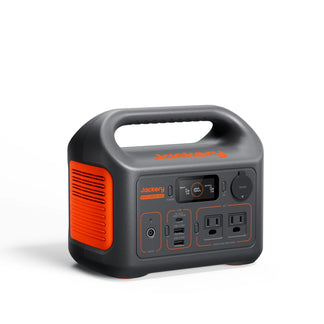
Jackery Explorer 300D Portable Power Station
The Jackery Explorer 300D Portable Power Station is an ultra-light, ultra-compact battery backup solution designed for lightweight, mobile work setups where charging needs are frequent but not heavy. It fits well for working from cafés without outlets, outdoor work sessions, road trips, or short travel days where staying charged matters more than running multiple devices. Its compact size and lightweight design make it easy to carry alongside your daily gear, allowing quick recharges between meetings or while moving between locations.
Appliances Running Time
- 16-inch MacBook Pro (140W) = 1.6H
- 16-inch MacBook Pro (96W) = 2.2H
- 14-inch MacBook Pro (70W) = 3.0H
- 15-inch MacBook Pro (85W) = 2.5H
- 13-inch MacBook Pro (60W) = 3.4H
Who Should Buy This
If you mainly need reliable charging for work-on-the-go, short remote sessions, or travel days without guaranteed power access, the Jackery Explorer 300D Portable Power Station is a practical fit.

Customer Review
Compact power perfect for running my power-hungry laptop on the pool deck.
— Mhartlvw.
Jackery Solar Generator 1000 v2
The Jackery Solar Generator 1000 v2 is a reliable battery backup solution better suited for longer work sessions where charging happens repeatedly throughout the day. It supports a fully remote work environment by keeping laptops powered while running accessories like monitors, routers, and lighting. This makes it useful during home power outages, outdoor offices, or multi-day trips where productivity cannot stop when the grid goes down. Its UPS mode switches power within 20 milliseconds to maintain device operation during voltage fluctuations or sudden power outages.
Appliances Running Time
- 16-inch MacBook Pro (140W) = 5.7H
- 16-inch MacBook Pro (96W) = 7.9H
- 14-inch MacBook Pro (70W) = 10.3H
- 15-inch MacBook Pro (85W) = 8.8H
- 13-inch MacBook Pro (60W) = 11.7H
Who Should Buy This
If your work requires all-day reliability or powering multiple devices alongside your main setup, the Jackery Solar Generator 1000 v2 offers more flexibility and runtime.

Customer Review
The backup power supplies (Jackery 1000 v2) are doing the job well so far. Thankfully, we haven’t lost power yet, but I let them power the fridge and freezer for a handful of cycles, and they worked.
— Anonymous.
For more information related to the runtime, you can check out our detailed blog: How Long Will a Jackery Run a Laptop/Computer/Tablet.
How to Troubleshoot Charger Wattage Issues?
Start by checking the charger’s wattage rating and ensuring it matches your device’s recommended power requirement. If charging is slow or inconsistent, you can inspect the cable, power adapter, and port for damage. Verify you are using a certified charger, and avoid low-wattage adapters that may not supply enough power. Also check for background apps or high-performance tasks that increase power demand while charging, as these can make charging appear slower even when the charger is working properly.
If you are facing any charger wattage issues, you might be wondering about some troubleshooting steps. While some causes are easy to fix on your own, others need professional help.
Check MacBook Warning Messages & Notifications
When the MacBook detects any issue with the charger wattage, it will display warning messages or notifications. For example, it may sometimes indicate the connected charger is not recognized or the charger wattage is insufficient. These messages will inform you about the problem and how to deal with it.
Try Other Chargers
Sometimes, the previous charger becomes faulty and may not provide adequate power for charging. In this case, it is best to try a different charger with known wattage that's compatible with your device. If the new charger works without issues, the original charger might be faulty.
Contact Apple Support
If you have examined the MacBook and the charger but could not find any issues, consider contacting the Apple Support team for professional help. You can either visit the Apple Store or schedule an appointment to get in touch with the professionals.
MacBook Pro Charger Wattage FAQs
How many watts is the MacBook Pro charger?
MacBook Pro typically need higher wattage for efficient charging. However, the exact watt requirement will depend on the device and the screen size. For example, the MacBook Pro 14 charger wattage is around 67W or 96W. The MacBook Pro 16 charger wattage is around 96W or 140W.
Is it ok to charge my MacBook to 100?
While it is ok to charge the MacBook to 100, it may sometimes cause overheating. Hence, it can impact the MacBook's battery life in the long run. Apple even recommends charging the laptop up to 50% to maintain appropriate battery health.
Is it ok to leave the MacBook charging overnight?
Yes, it is ok to leave MacBook charging overnight as it does not affect the long-term durability. Thanks to the advanced capabilities of the MacBook, it is not possible to overcharge the MacBook battery, nor can it damage or overheat any components. If you want to learn more, you can check our detailed guide: Is It Okay To Leave a Laptop Plugged In All The Time.
How do I keep my battery 100% healthy?
If you want to keep the MacBook battery healthy, it is advised not to charge or discharge it fully. You must power it around 50% for optimal performance. In order to avoid additional battery use, you must power down the device and place it in a cool, moisture-free environment.
Should I unplug the MacBook when fully charged?
You can leave the MacBook plugged in most of the time, and the laptop will use the battery when needed. The optimized battery charging battery reduces wear on the battery and even improves its lifespan.
Final Thoughts
MacBook Pro chargers consume relatively modest power, but understanding how many watts does a MacBook Pro charger use helps when planning off-grid or backup energy needs. As laptop charging is predictable and low-demand, it pairs well with portable solar generators. With the right Jackery Solar Generator, you can keep your MacBook Pro charged and continue working through outages or while away from traditional power sources without relying on noisy fuel-powered equipment.


![How to Charge MacBook Pro Without Charger [Ultimate Guide 2024]](http://www.jackery.com/cdn/shop/files/how-to-charge-macbook-pro-without-charger-ultimate-guide-2024-1530010.jpg?v=1786014875&width=90)


