






















































































































![[Add-on] Jackery SolarSaga 500 X - Jackery](http://www.jackery.com/cdn/shop/files/add-on-jackery-solarsaga-500-x-1493607.webp?v=1786503068&width=324)





![[Add-on] Jackery Battery Pack 5000 Plus - Jackery](http://www.jackery.com/cdn/shop/files/add-on-jackery-battery-pack-5000-plus-6713401.webp?v=1786503068&width=324)


























































Solar Power at Night: Net Metering vs. Battery vs Portable Backup – Which Strategy Works Best for You in 2026?
Quick Answer: Solar panels don’t work at night—they need photons. To power your home after dark, you have three options: net metering credits to draw back surplus daytime energy from the grid, an on-site battery storing solar output, or a portable power station charged during the day. Each path differs in cost, policy risk, and control.
Key Takeaways
- Solar panels produce zero electricity at night; you must store energy or use grid credits to cover evening consumption.
- Net metering can offset night loads but depends entirely on your utility’s export rate—California’s NEM 3.0 cut credits by roughly 75%, making batteries a smarter choice there.
- A residential LiFePO4 battery costs $800–$1,300 per usable kWh installed in 2026, giving you full control over your solar surplus without relying on utility buyback rates.
- Portable power stations offer a low-commitment backup for renters, condo owners, and emergency prep—no roof panels, no permits, no policy headaches.
- A typical home’s essential night load (fridge, lights, router, a few electronics) runs 3–6 kWh from sunset to sunrise; size your backup accordingly.
Why Solar Panels Go Dark After Sunset – The Physics Shortcut
The photovoltaic effect stops the instant light intensity drops below a threshold—roughly 10 W/m². At night, moonlight delivers only 0.0034 W/m², compared to 1,000 W/m² under peak sun.
That’s 400,000 times too weak to generate any meaningful current. Your panels become inert glass. The inverter still draws 1–5 watts in standby, but it outputs zero AC power.
A common myth: panels “store” electricity. They don’t. They convert photons into electron flow only while sunlight hits them. There is no workaround for physics—if you want solar power after sunset, you need stored energy or a credit system that lets you pull power from the grid.
That leaves three practical strategies for night power: net metering, battery storage, and portable backup. The right one depends on whether you own your roof, your state’s export policies, your outage risk, and your budget.
Decision Framework: 3 Paths to Solar Power After Dark
Path |
How It Works |
Best For |
Net metering |
Send surplus daytime solar to the grid, draw back at night at a rate set by your utility. |
Homeowners in states with strong net metering rules and few outages. |
Battery storage |
Capture excess solar in a LiFePO4 pack during the day, discharge it after sunset. |
Homeowners who want independence from utility rate changes and backup during blackouts. |
Portable backup |
Charge a power station from a wall outlet or portable solar panels during the day; use its AC outlets at night. |
Renters, condo owners, anyone without roof access, or people who want emergency power without installing hardware. |
Each path has a different cost structure and risk profile. The next three sections break them down.
Path 1: Net Metering – Works Only If Your State Pays Fair Credits
Net metering lets you bank daytime surplus as kWh credits, which you draw down at night to offset imports. The financial value of those credits is everything.
- Retail-rate net metering (where a kWh exported offsets a kWh imported) effectively turns the grid into a free battery, but it’s becoming rare.
- California (NEM 3.0): Export credits cut by about 75%, dropping from roughly $0.30/kWh to around $0.08/kWh; solar-only is a poor investment without a battery.
- Texas: No statewide mandate; utilities typically buy back surplus at 3–8¢/kWh while charging 14–16¢/kWh for imports.
- Nevada, Florida, New York: Still offer near‑retail credits, so net metering remains viable without storage.
Payback on a net-metered-only system now runs 8–12 years, driven entirely by the gap between your avoided import cost and the export rate. If your state’s export credit is low, you’re better off storing the energy yourself.
The catch: net metering provides no backup power during a grid outage. When the grid goes down, your inverter shuts off for safety unless you have a battery and an islanding-capable setup. So net metering alone leaves you in the dark when blackouts hit.
Path 2: Battery Storage – Full Control, Higher Upfront Cost
A battery captures 100% of your solar surplus and lets you use it whenever you want—no reliance on a utility’s ever-changing export rate. Residential battery storage costs $800–$1,300 per usable kWh installed in 2026. A 13.5 kWh system runs $11,500–$16,500.
Modern home batteries use LiFePO4 chemistry with these key specs:
- Cycle life: 3,000–5,000 cycles
- Lifespan: 10–15 years of daily use
- Round-trip efficiency: 95–97%
Plan your storage capacity with these guidelines:
- For essential night loads (fridge, Wi‑Fi router, a few LED lights, phone charging), allocate 3–6 kWh of storage. Add a 20–30% buffer for cloudy days.
- For heavier loads (well pump, central AC), you’ll need 10–30 kWh, which large stackable power stations can deliver without permanent installation.
Batteries also let you participate in virtual power plant (VPP) programs, selling stored energy back to the grid during peak evening hours at 10–20¢/kWh—improving your return on investment. However:
- The upfront cost is substantial.
- Payback depends heavily on your local peak/off-peak price spread. If the spread exceeds $0.28/kWh, a battery can cut your payback period by 2–4 years compared to solar-only.
If you’re considering battery storage for essential home backup, the home backup power system generator vs battery comparison shows why LiFePO4 batteries now outperform fuel-based generators for quiet, maintenance-free operation.
Path 3: Portable Backup – No Roof, No Permits, No Policy Risk
Portable power stations offer a backup solution for renters, condo owners, and anyone who can’t install rooftop solar—no roof, no permits, no policy risk. You charge them from a standard wall outlet or portable solar panels during the day, then use their AC outlets to run essential devices at night.
There’s no federal or state incentive for these consumer electronics, but the upfront cost is low. Here’s why they work:
- Cost: $1,500–$5,000 for a unit that can keep a refrigerator, router, and lights running overnight.
- Installation: No electrician, no permits, no roof penetration.
- Portability: Works for RV trips, camping, or temporary backup during an outage—regardless of what your utility does with net metering.
For renters who want a secure night power backup without any permanent changes, a portable station is the most practical answer. For a detailed guide on sizing, what size solar generator do I need walks through the math based on your specific appliances.
What to Know Before You Choose
Limitations:
- Net metering credits can drop overnight. Utility commissions can revise export rates. If you build a solar-only system expecting retail credits, a policy change can stretch your payback from 8 years to 15.
- Batteries add $5,000–$10,000 upfront. That’s a serious capital outlay. You won’t recoup it quickly unless your time-of-use rate spread is wide or you face frequent outages that cost you spoiled food and lost productivity.
- Portable units can’t run whole-house loads. A 2 kWh power station won’t start a central AC or a well pump. They’re for essential circuits—fridge, lights, electronics. If you need whole-house backup, you’ll need a permanently installed battery system or a large stackable portable setup with high surge capacity.
- All paths require daytime charging. Whether you charge a battery from rooftop solar or a portable station from the grid, you must put energy in during the day. A cloudy day reduces input, so size your storage with a buffer.
- No battery lasts forever. LiFePO4 cells deliver 3,000–5,000 cycles. After 10–15 years of daily cycling, capacity fades to about 80%. Factor replacement cost into long-term planning.
How to Choose the Right Backup Capacity for Your Night Needs
Start with your essential night load. A typical home uses 3–6 kWh from sunset to sunrise for a refrigerator, Wi‑Fi router, a few LED lights, and phone charging. If you add a portable AC or home office equipment, that number climbs to 6–10 kWh.
Use this formula:
(Running Watts × Hours Used) ÷ 1,000 = Daily kWh
Example: A refrigerator drawing 150 W running 8 hours overnight uses 1.2 kWh. Add a router (10 W × 10 h = 0.1 kWh) and five LED bulbs (50 W total × 6 h = 0.3 kWh). Total: 1.6 kWh. Double that for a safety buffer, and you’ll want at least 3.2 kWh of usable storage.
For whole-house backup that includes a well pump or central AC, plan 10–30 kWh. Pay attention to surge capacity—refrigerator compressors and pump motors can draw 2–3× their running watts for 1–2 seconds. Your backup system must handle that spike without tripping.
The table below matches common night loads to suitable Jackery setups.
Night Load Scenario |
Approx. Energy Needed |
Recommended Jackery Setup |
Fridge, router, lights, phone |
3–4 kWh |
Jackery HomePower 3600 Plus (3,584 Wh) |
Fridge, freezer, router, lights, fan, home office |
5–6 kWh |
Jackery Explorer 5000 Plus (5,040 Wh) |
Renters / small apartment essentials |
1.5–2 kWh |
Jackery Explorer 2000 v2 (2,042 Wh) |
Jackery Portable Power Stations for Essential Night Backup
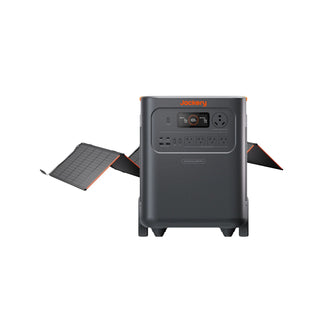
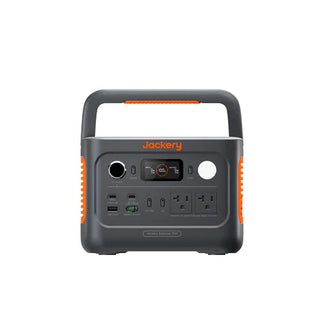
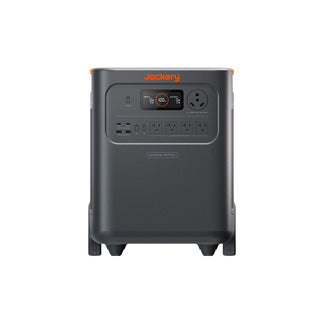
When you need reliable night power without a permanent installation, Jackery’s LiFePO4 power stations offer a plug-and-play solution. They charge from a wall outlet or portable solar panels during the day and deliver AC power to your essential appliances after sunset—offering the same portable backup advantages described in Path 3. For a closer look at how to build a secure backup around your specific appliances, see how to build a secure power backup for home appliances.
Model |
Capacity |
Continuous / Surge Output |
Key Benefit |
Jackery Explorer 5000 Plus |
5,040 Wh (expandable to 10,080 Wh) |
7,200 W / 14,400 W |
Runs a refrigerator, lights, and router through a 12‑hour night; surge handles well pump startup. |
Jackery HomePower 3600 Plus |
3,584 Wh |
3,600 W / 7,200 W |
Powers a fridge for 38 hours on a single charge; covers essential evening loads with headroom. |
Jackery Explorer 2000 v2 |
2,042 Wh |
2,200 W / 4,400 W |
Compact 39.5‑lb unit fits in a closet or trunk; recharges as fast as 1.7 hours via Emergency Super Charge. |
All three models share these features:
- Battery chemistry: LiFePO4 cells rated for 3,000–5,000 cycles
- Outlets: Multiple AC outlets and USB ports
- Inverter: Pure sine wave, safe for sensitive electronics
They’re not whole-home systems, but they provide essential home backup without the complexity of a permanent battery installation. For a broader comparison of top battery backup options, check best battery backup generators.
Frequently Asked Questions (FAQ)
What happens to solar power during a grid outage?
Grid-tied solar panels automatically shut down for safety unless you have a battery and an islanding-capable inverter.
Can I add a battery to an existing net metering system?
Yes, you can retrofit a battery to most grid-tied systems, but you’ll need a hybrid inverter or an AC-coupled solution.
How do I monitor my solar and battery usage at night?
Most modern inverters include a monitoring app that displays real-time generation, consumption, and battery status on your phone.
Do solar panels need any special maintenance at night?
Nighttime is the ideal time to clean panels safely because they are cool and avoid the risk of thermal shock from cold water.
Is net metering still worth it if my state has good rates?
In states with retail-rate net metering, you can offset nighttime usage without a battery, but you lose backup power during grid outages.
Disclaimer:
The runtime mentioned for appliances powered by Jackery is for reference only. Actual runtime may vary under different conditions. Please refer to real-world performance for accurate results.

