






















































































































![[Add-on] Jackery SolarSaga 500 X - Jackery](http://www.jackery.com/cdn/shop/files/add-on-jackery-solarsaga-500-x-1493607.webp?v=1786503068&width=324)





![[Add-on] Jackery Battery Pack 5000 Plus - Jackery](http://www.jackery.com/cdn/shop/files/add-on-jackery-battery-pack-5000-plus-6713401.webp?v=1786503068&width=324)


























































Quick Answer: A portable solar charging station combines solar panels, a LiFePO₄ power station, and an inverter to power laptops, monitors, and routers off-grid. Calculate your daily watt-hour consumption with a plug-in meter, then select panels generating at least that amount under local peak sun hours and pair them with a battery covering 2–3 days of buffer capacity.
Key Takeaways:
- Power auditing is mandatory — using a Kill-a-watt meter to measure actual device consumption prevents buying an undersized system that dies during video calls.
- USB-C PD charging cuts energy loss to 5–10% versus 20–25% via AC, extending laptop runtime by 15–20% on the same battery capacity.
- Include 2–3 days of battery storage buffer to handle cloudy days when solar production drops to 50–80% of rated output.
- A 200W panel under 5 peak sun hours generates about 800–1000 Wh, enough for a basic remote-work load of 400–700 Wh/day.
Remote work doesn’t need a wall outlet anymore. A well-sized portable solar charging station lets you work from a campsite, a van, or a balcony with nothing but sunlight. But sizing one correctly separates a productive workday from a dead laptop at 2 PM. This guide walks through the exact steps — from measuring your actual power draw to choosing panels and batteries that won’t leave you stranded.
What Power Do You Need for Remote Work?
A typical remote-work setup — laptop, external monitor, and Wi-Fi router — draws between 400 and 700 watt-hours over an 8-hour workday. A laptop pulls 60–100W, a monitor adds 30–60W, and a router sips 10–20W. Those numbers stack up fast.
The #1 beginner mistake is guessing instead of measuring. Skipping actual consumption testing leads to dead batteries mid-workday because estimates are often 30–40% too low. A laptop’s nameplate rating means little — actual draw fluctuates with screen brightness, CPU load, and whether you’re on a video call or typing a document.
Starting wattage creates another trap: monitors and small printers briefly draw 2–3× their rated running power at startup. A 50W monitor might spike to 150W for a second. Your inverter needs headroom to handle that surge without tripping overload protection.
Add a 20–30% buffer beyond your measured consumption. This covers inverter inefficiency, phone charging, and the occasional device surge during the day. If your meter shows 500 Wh over 8 hours, size for at least 650 Wh. Understanding what size solar generator you need starts with that real-world measurement.
The only reliable method: Use a plug-in watt-meter like a Kill-a-watt. Plug your entire workstation into it, work a normal day, and read the total kilowatt-hours. That number — not a spec sheet — determines what battery and panels you actually need.
How to Size Solar Panels for Your Charging Station
Solar panel sizing comes down to one number: peak sun hours. In the continental US, this averages 4–5 hours per day, but varies sharply by region.
Arizona sees 6–7 hours; Seattle might get 3. Use NLR solar irradiance maps for your specific location — don’t guess. [1]
The math is straightforward:
200W panel × 5 peak sun hours × 0.85 efficiency factor = 850 Wh per day
A 200W panel under 5 peak sun hours generates roughly 800–1000 Wh daily. That covers a basic remote-work load of 400–700 Wh with margin for battery charging. If your consumption runs higher — say, dual monitors and a powerful workstation laptop — step up to 300–400W of solar.
MPPT charge controllers capture up to 30% more energy than PWM, especially in partial shade or low-light morning and evening conditions. Every portable power station worth buying includes MPPT (understanding the solar generator vs portable power station vs solar panel distinction helps avoid confusion). If you’re building a DIY setup, don’t cheap out on the controller — the extra 20–30% harvest pays back within months.
Over-panel by 20–30% beyond your calculated needs. Clouds, haze, and imperfect panel angles cut output significantly. A 200W panel rarely produces 200W outside lab conditions. Having extra capacity means you still hit your daily target when conditions aren’t perfect.
For mobile work setups, portable foldable panels around 200W hit the sweet spot. They balance weight, power output, and ease of transport. Two 100W panels give more positioning flexibility than one 200W panel — you can angle them independently as the sun moves.
How to Choose the Right Battery Capacity?
Battery capacity in watt-hours must cover at least one full workday plus overnight device charging. If your workstation burns 600 Wh during an 8-hour day and you charge a phone and headset overnight, a 1000 Wh battery gives you a comfortable single-day buffer.
LiFePO₄ (LFP) chemistry is the only sensible choice for daily off-grid work. Here’s how it compares to lead-acid:
Feature |
LiFePO₄ |
Lead-Acid |
|---|---|---|
Cycle life |
3,000–5,000 cycles to 80% capacity |
Half the cycle life |
Usable capacity |
100% depth of discharge |
Half the usable capacity |
Voltage stability |
Stable throughout discharge |
Voltage sag under load |
Lifespan (daily use) |
8–13 years |
Shorter lifespan |
LiFePO₄ has become the standard in the best battery backup generators for remote work because of these advantages.
100% depth of discharge is usable with LiFePO₄ without significant degradation. A 1000 Wh LFP battery gives you the full 1000 Wh. A 1000 Wh lead-acid battery gives you roughly 500 Wh before voltage drops too low — and repeated deep discharges kill it within a year.
A 1000–1500 Wh power station suits most single-worker setups. That runs a laptop, monitor, and router for 10–15 hours with buffer. Multi-day trips away from any charging source may require 2000 Wh or more. If you’re working remotely for a week in a national forest, you need enough capacity to ride through 2–3 cloudy days when solar production drops to 50–80% of rated output.
Expandable battery systems let you add extra capacity later if energy needs grow. You might start with 1000 Wh and discover you want to power a portable fridge alongside your office gear. Adding a second battery is cheaper than replacing the whole system.
Step-by-Step Setup for a Portable Solar Station
The two most critical factors for your station’s runtime are panel placement and port selection: angling panels at 30–45° true south and plugging devices into USB-C PD rather than AC outlets save 15–20% battery life. Here’s the full sequence.
Position the panels
Angle panels at 30–45° facing true south in the northern hemisphere. True south differs from magnetic south — check a compass and adjust for your local declination. Flat panels produce significantly less power. Even a 20° tilt improves output by 10–15% versus laying panels flat on the ground.
Connect panels to the power station
Use the included MC4 or Anderson cables. Verify correct polarity before plugging in — most connectors are keyed, but forcing a reversed connection can damage the charge controller. The station’s LCD display will show zero input until you complete this step.
Check the solar input reading
Turn on the station and check the input wattage on the display. If it’s lower than expected — a 200W panel showing 80W at noon — adjust the panel angle. Even a 15° misalignment can cost 20–30% of potential output. Move panels every 2–3 hours to track the sun if you’re working a full day.
Prioritize USB-C PD ports
Plug laptops and phones into USB-C PD ports, not AC outlets, to minimize conversion losses.
Charging Method |
Conversion Loss |
Battery Runtime Impact |
|---|---|---|
USB-C PD |
5–10% |
15–20% longer runtime |
AC Inverter |
20–25% |
Baseline |
The same 1000 Wh battery runs your laptop 15–20% longer through USB-C than through the AC adapter.
Enable Low Voltage Disconnect
If your station has DC load terminals with LVD, enable it. This prevents connected devices from draining the battery overnight if you forget to unplug them. A router left connected to DC output can pull 10–20W continuously — enough to kill a small battery by morning.
Limitations / What to Know Before
- Weather dependency is severe. Cloudy or rainy days slash solar harvest by 50–80%. A setup that hums along in July sunshine might produce almost nothing during a three-day December storm. You need a backup charging plan — a car charging cable or access to grid power — for extended bad weather. Without it, you’re gambling with your ability to work.
- Not for high-wattage appliances. Portable stations cannot practically run space heaters, air conditioners, or full-size refrigerators for more than brief periods. A 1500W space heater would drain a 1000 Wh battery in under 40 minutes. These systems are designed for electronics and small loads, not heating or cooling.
- Panel placement is critical. Trees, buildings, even accumulated dust can drastically reduce output. A single leaf shading one corner of a panel can cut production by 30% or more. Clean panels daily and reposition them as shadows move. A panel that worked perfectly at 10 AM might be useless by 2 PM if a tree casts shade.
- Security and theft risk exists for semi-permanent outdoor setups. Panels left unattended at a campsite or on a balcony visible from the street are targets. Hide batteries in cabinets or vehicles. Mount panels high and locked if they’ll stay in one place for days.
- Backup power strategy is essential. Maintain a car charging cable or small generator. A 12V car outlet typically charges a 1000 Wh station in 4–6 hours of driving. That’s your lifeline if solar fails for days. The best portable solar charging station is worthless without a plan for when the sun doesn’t cooperate.
Product Recommendation: Jackery Portable Solar Charging Stations
Jackery’s Explorer series pairs LiFePO₄ batteries with pure sine wave inverters in portable form factors designed for exactly this use case. Two configurations cover most remote-work scenarios.
Use Case |
Recommended Model |
Battery |
Inverter |
Runtime |
Weight |
|---|---|---|---|---|---|
Single-worker mobile (laptop, monitor, router) |
Jackery Explorer 1000 v2 |
1070 Wh LiFePO₄ |
1500W pure sine wave |
10+ hours |
23.8 lbs |
Multi-day off-grid (dual monitors, fridge, multiple devices) |
Jackery Explorer 2000 v2 |
2042 Wh LiFePO₄ |
2200W continuous |
2 full workdays |
39.5 lbs |
Explorer 1000 v2 highlights:
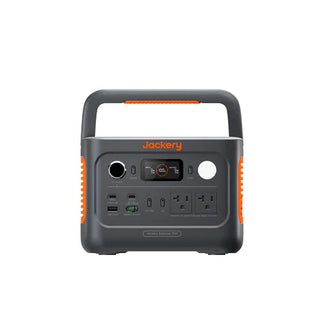
- Runtime: Powers a laptop, monitor, and router for over 10 hours — a full workday with buffer.
- Inverter: 1500W pure sine wave handles startup surges from monitors and small printers without tripping.
- Portability: 23.8 lbs with a compact foldable handle; moves easily from campsite to van desk to balcony workstation.
Explorer 2000 v2 highlights:
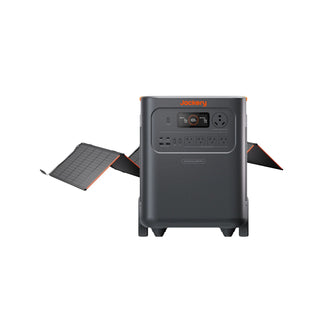
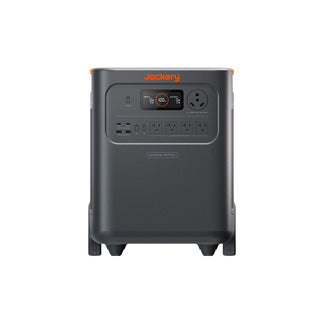
- Capacity: 2042 Wh (doubles the 1000 v2), supporting two full workdays or a portable fridge alongside your office gear.
- Inverter: 2200W continuous output runs dual monitors or an extra workstation simultaneously.
- Emergency Charge: 1.7-hour Emergency Super Charge via AC outlet provides rapid refill when grid access is briefly available.
Solar panel pairings:
- For Explorer 2000 v2: Jackery SolarSaga 500X (500W) folds compactly and recharges the unit in roughly 4–5 peak sun hours — enough for continuous off-grid operation.
- For Explorer 1000 v2: Two Jackery SolarSaga 100W Solar Panels (200W total) give a lightweight, easily portable input balanced for the mobile workstation.
- Technology: High-efficiency bifacial cells capture sunlight from both sides, maximizing daily energy harvest.
Frequently Asked Questions (FAQ)
Can I run a monitor and laptop off one power station?
Yes, as long as the combined running wattage stays under the inverter’s continuous rating, which most 1000 Wh+ stations handle easily.
How long does a full solar charge take in winter?
Winter peak sun hours drop to 2–3 per day, so a 200W panel may need 6–8 hours to fully recharge a depleted 1000 Wh battery.
Will my power station charge while I’m using it?
Most modern stations support pass-through charging, allowing simultaneous solar input and device output without damaging the battery.
What cable do I need to charge from my car?
A 12V car cigarette lighter to Anderson or XT60 cable typically charges a 1000 Wh station in 4–6 hours while driving.
Can I leave solar panels connected to the battery all the time?
Yes, the built-in charge controller automatically stops charging once the battery is full, preventing overcharging damage.
Sources & References
[1] NREL Solar Resource Maps, National Renewable Energy Laboratory, https://www.nlr.gov/gis/maps, accessed June 2026.


